DocsExcel
Which rows are exported
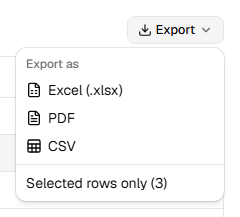
By default an export holds every row that passes the table's filters, on every page, in the current sort. Paging is a screen concern; the file gets the whole result.
The rows option changes that:
rows |
Rows in the file |
|---|---|
"all" (default) |
Every filtered row, all pages, grouped and sorted as on screen. |
"page" |
Only the rows on the current page. |
"selected" |
Only the selected rows (needs TanStack's row selection). |
await exportXlsx(table, { rows: "selected" })ExportMenu adds a "Selected rows only" checkbox when rows are selected. A selection column is usually a display column with checkboxes. Display columns have no accessor, so Rowpine leaves them out of the file on its own:
helper.display({ id: "select", cell: ... }) // not exported: no accessor
Was this page helpful?
Thanks. To tell us more, write to info@jqwidgets.com.