DocsPivot
Aggregations
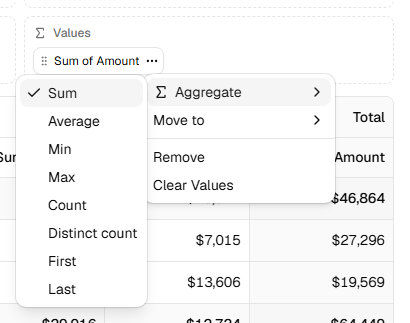
Each value in a pivot has an aggregation:
agg |
Result |
|---|---|
sum |
Total of the numbers. |
avg |
Mean of the numbers. |
min, max |
Smallest and largest number. |
count |
Number of rows. |
countDistinct |
Number of different values. |
first, last |
The first or last value, in data order. |
Text that is not a number is skipped by sum, avg, min and max. A cell with no rows at all (no sales of a product in a quarter) is empty, not zero.
A function works too. It gets the values that fall in the cell:
const median = (values: readonly unknown[]) => {
  const n = values.map(Number).filter((v) => !Number.isNaN(v)).sort((a, b) => a - b)
  return n.length ? n[Math.floor(n.length / 2)] : null
}

values: [{ field: "amount", agg: median, label: "Median order" }]
In the pivot designer, users pick the aggregation from a value chip's menu. The same field can be in Values twice with different aggregations, such as sum and average of Amount.
Live example and sourceRun this in the browser and read the code behind it.Open →
Was this page helpful?
Thanks. To tell us more, write to info@jqwidgets.com.