DocsPivot
Export a pivot
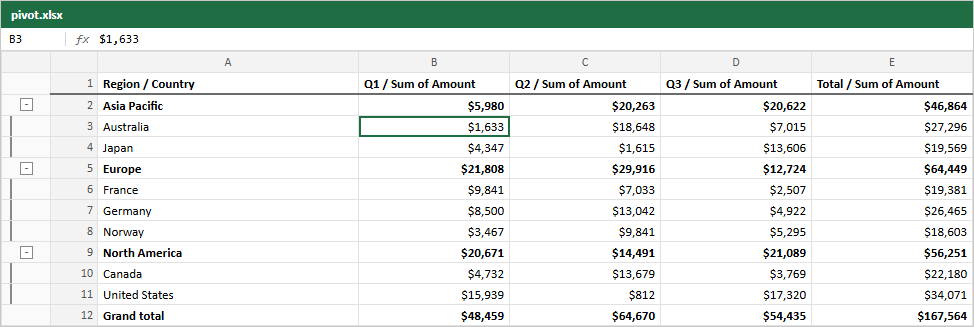
A pivot exports like any table. pivot.table is a table view of the pivot for the exporters:
import { pivotRowStyle } from "rowpine"

<ExportMenu table={pivot.table} fileName="sales-pivot" rowStyle={pivotRowStyle} />

// or from code
await exportXlsx(pivot.table, { rowStyle: pivotRowStyle })
pivotRowStyle makes group, subtotal and grand total rows bold.
In Excel, row groups become outline levels (the bars on the left of the image) and the column headers join the column groups with the measure: Q1 / Sum of Amount. The cells are numbers with the numFmt from pivotOptions (or the third argument of createPivot), so they can be summed and charted.
The file holds every row, including groups collapsed on screen, and only the rows the designer's filters let through.
Live example and sourceRun this in the browser and read the code behind it.Open →
Was this page helpful?
Thanks. To tell us more, write to info@jqwidgets.com.