DocsPivot
Expand and collapse groups
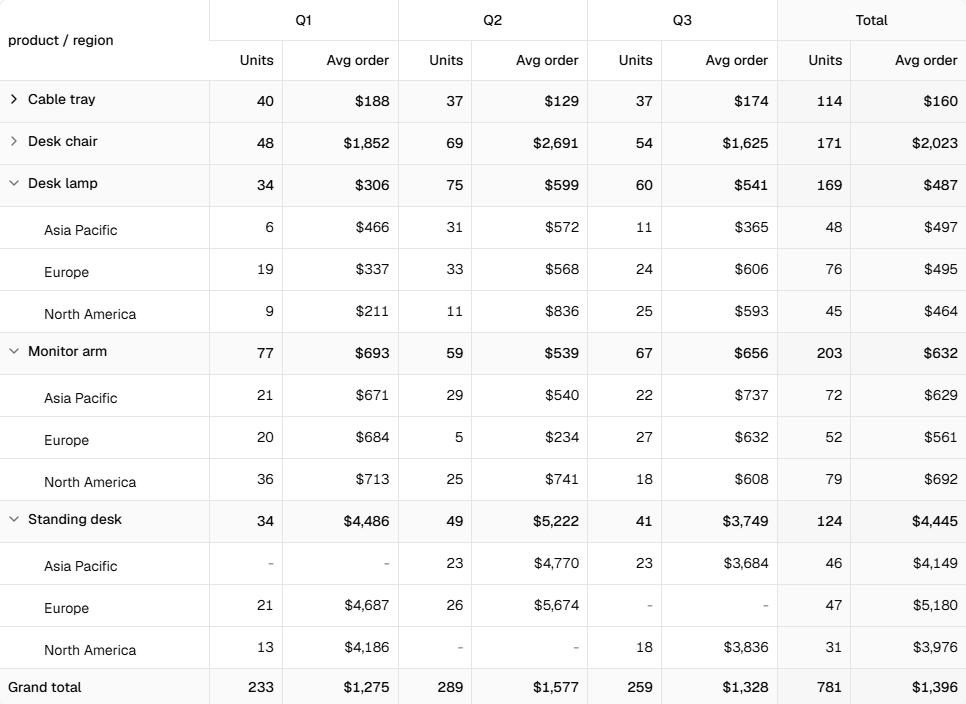
Group rows in PivotTable have a chevron. Clicking it hides or shows the rows under the group. The group keeps its subtotal, so a collapsed pivot still adds up.
The table keeps its own state, or you can control it:
import { expandableIds, PivotTable } from "@/components/pivot-table"

const [collapsed, setCollapsed] = useState<Set<string>>(new Set())

<button onClick={() => setCollapsed(expandableIds(pivot))}>Collapse all</button>
<button onClick={() => setCollapsed(new Set())}>Expand all</button>
<PivotTable pivot={pivot} collapsed={collapsed} onCollapsedChange={setCollapsed} />
defaultCollapsed starts an uncontrolled table with every group closed.
Collapsing is a view setting. Exports always hold every row, with groups as Excel outline rows the user can collapse in Excel.
Live example and sourceRun this in the browser and read the code behind it.Open →
Was this page helpful?
Thanks. To tell us more, write to info@jqwidgets.com.