DocsGetting started
Column settings for exports
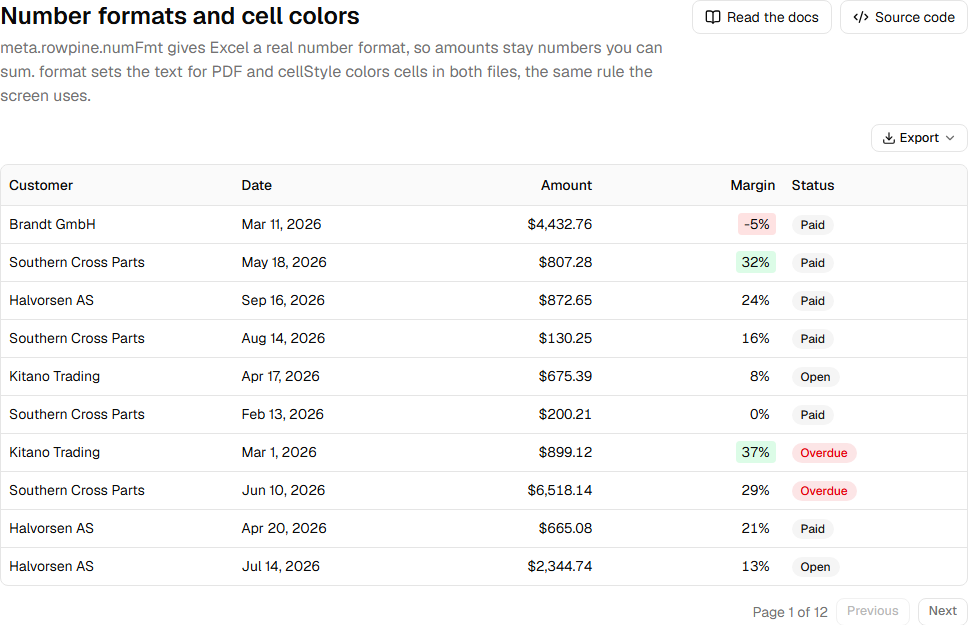
Per-column export settings go in the column's meta.rowpine. Your table renders as before; Rowpine reads these only when it writes a file.
helper.accessor("amount", {
  header: "Amount",
  cell: (c) => money.format(c.getValue()),
  meta: {
    rowpine: {
      numFmt: '"$"#,##0.00',
      format: (v) => money.format(v as number),
      cellStyle: (v) => ((v as number) < 0 ? { color: "#b91c1c" } : undefined),
    },
  },
})| Key | Used by | What it does |
|---|---|---|
header |
all | Header text in the file. Default: the column's string header, else its id. |
numFmt |
Excel | Excel number format. See number and date formats. |
format |
Text for a value. Default: numbers and dates in the browser's locale. | |
cellStyle |
Excel, PDF | { fill, color, bold } for a cell. See cell colors. |
width |
Excel | Width in pixels. Default: the column's TanStack size. |
align |
Excel, PDF | left, center or right. Default: right for numbers. |
exclude |
all | Never export this column. Display columns (no accessor) are excluded unless this is false. |
With TanStack v9, type meta by adding a column meta slot to your features:
import type { RowpineColumnMeta } from "rowpine"

const features = tableFeatures({
  // ...your features
  columnMeta: metaHelper<{ rowpine?: RowpineColumnMeta<Order> }>(),
})
With v8, add rowpine?: RowpineColumnMeta<TData> to the ColumnMeta interface through module augmentation.
Was this page helpful?
Thanks. To tell us more, write to info@jqwidgets.com.